Optifly
Redesigning a complex airline scheduling platform to give users more control and reduce operational overhead.
Year
2026
Client
Vanguard
Services
Brand, website design, development
Live site
About


Frequent actions were high friction.
Related information was scattered, and the interface made it difficult to inspect or edit items.
The system lacked visibility of status and necessary controls.
Users struggled to translate their goals into the settings required to achieve them. There was no visibility of status during optimisation runs. Combined, this made the system feel like a ‘black box’.


Design began by introducing a design system centred around a table component. This introduced modularity and addressed frequent pain points. The table is the main visual tool that schedulers use and accounted for the majority of user pain points.


Before optimisation could begin, schedulers needed to configure a schedule plan. This gave the schedule optimiser instructions on what to schedule.
This was the most input-heavy part of the product and where most pain points existed. The new design system was used to address this.

The original design forced users to update 100s of rows one by one. Bulk editing was added to allow users to edit items in one pass.


Complex filtering allowed users to search for errors, cross-check data faster, and perform bulk editing without needing to search item by item.


Settings directly tied to the schedule plan were buried on other pages, making them difficult to reference.
Key details were made accessible in one step by adding a side sheet that allowed users to review key details and settings related to a given route.


Split-screen capability was added to make comparison easier and reduce the effort involved in moving between views.
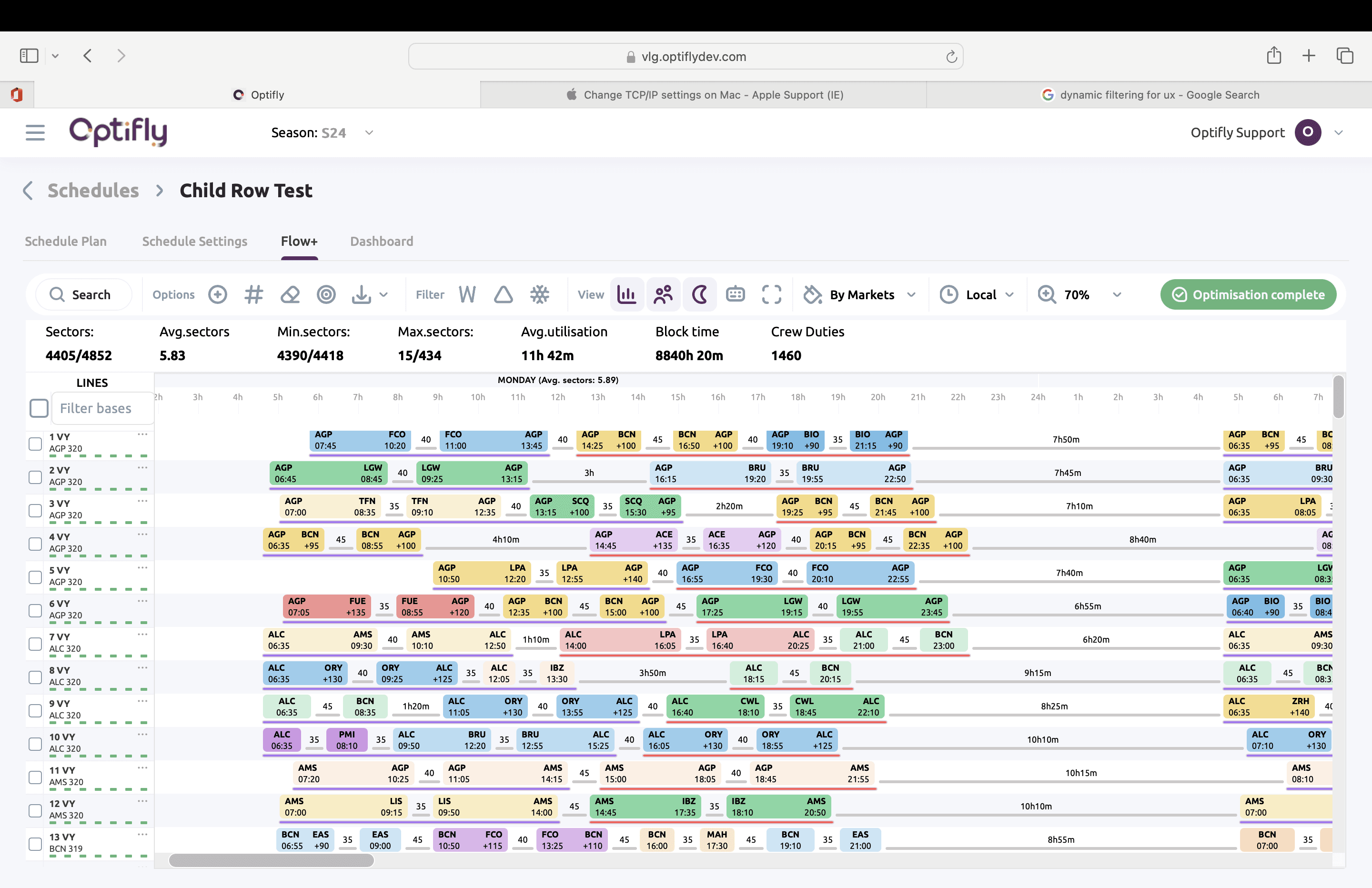

The flow screen displayed the schedule generated by the optimiser. Users lacked key visual data needed to understand and assess the result. This made it harder to identify anomalies, inspect individual routes, and understand whether the generated schedule met their requirements.
This was addressed by adding important operational details such as buffers, ground events, crew schedules, maintenance and slots.


The flow screen was used for many different use cases. As such, different data was needed at different times and in different combinations.
Visual elements were thus designed to be configurable, allowing the scheduler to toggle the data they needed for the use case in context.


Making information accessible
As seen with the schedule plan, important statistics and route details were buried on other pages, making them difficult to reference.
Sliding information drawers were added to expose additional statistics and route details without forcing users away from the schedule view.

Matching settings to user goals
I collaborated with the optimisation team to develop configurable, goal-based setting profiles that allowed users to adjust the optimiser in terms that were meaningful to their work.


Allowing for manual control
Schedulers were accustomed to constructing schedules manually. Optifly's optimisation-led approach disrupted this familiar workflow.
I designed a manual schedule builder and integrated it directly into the flow screen. Users could switch into edit mode, make changes to a schedule, and then generate a revised result around their adjustments.


Updating information architecture for experimentation
The optimisation process was highly iterative. The scheduling team would create a baseline schedule, then add different rules sequentially. This was done by duplicating the schedule, which was hard to track and navigate.
I updated the IA to accommodate this: duplicate schedules were saved in a project as ‘experiments’. Users could track changes and compare results in 2 clicks.

-49%
Reduction in support
+25%
Faster schedule creation
+116%
Weekly active users


<more work>
———>